An agency workflow from brief to reviewed campaign
A comment campaign needs more than a catchy keyword. An agency needs a clear resource promise, an approved reply, a working destination, a responsible owner and a record of what happens next. GramTrigger helps prepare those decisions before requests arrive. Its public builder produces rules-based drafts without a social login or signup. It does not retrieve Instagram comments or send messages for you. Use the free result to evaluate the workflow before deciding whether a paid campaign record fits your team.
1. Define the offer and resource promise
Write one sentence describing the resource, who it helps and the next step it supports. A checklist, guide, template and consultation serve different needs. Avoid a broad promise such as getting more leads when the actual deliverable is a short PDF. Your client should be able to explain what someone receives and why the resource is useful before the team chooses a caption.
Prepare the actual resource separately. The builder drafts a campaign plan; it does not create or host the promised downloadable asset. Check the resource owner, destination page and delivery process. For a launch with several offers, keep a separate reviewed brief for each offer rather than reusing a generic reply that points everyone to the same destination.
2. Choose a keyword people can recognise
A useful keyword describes the resource and is easy to type. CHECKLIST, GUIDE or TEMPLATE can be appropriate when they match the offer. Avoid using the same broad word across several active client campaigns if it makes manual request handling ambiguous. Record the source post and resource alongside the keyword in your own operating sheet.
The generated keyword options are suggestions from transparent rules, not research into current Instagram demand or a prediction of conversion. Read the caption aloud and check that it asks for one clear action. A comment is a request for the promised resource; it is not proof of permission for unrelated messages or a sale.
3. Review the draft before asking for approval
Check the caption, pinned comment, reply and follow-up drafts together. They should make the same promise, use the correct resource title and explain the next step without pressure. Replace placeholders, review tone and confirm any claim against the actual client offer. When you change advanced inputs, regenerate the blueprint so the copied result reflects those changes.
The interactive checklist starts unchecked. Acknowledging an item records your own review in the current result only. It does not send a client approval request, save an approval audit trail or authorise social publishing. Share the downloaded plan through your existing client review process and keep the final approval/version record there. A new blueprint resets the temporary acknowledgements.
4. Keep the handoff useful and clearly scoped
Copy or download the full blueprint for an internal discussion. The text includes the draft copy, workflow, export fields and current checklist acknowledgements. Optional browser saving keeps the latest planning inputs for seven days on that browser; it does not synchronise plans across agency accounts or devices. It excludes the public demo request table and its contact fields.
Create Campaign carries a short-lived reviewed draft into the protected campaign form. Confirm the post URL, destination and reply before saving. New accounts start with zero campaign credits. A purchased credit is required to save a campaign record, so the free blueprint and the paid account record are different steps. No campaign is saved merely because you opened the form.
5. Plan request handling without invented leads
The public Request Inbox is a practice table. It begins empty and provides a CSV template so your agency can define its workflow without exporting a fictional contact by default. Load a clearly fictional sample only when demonstrating the interface, or add demo rows to practise status changes. Keep real contact details out of this public practice area.
For actual campaign operations, use your authorised account workflow and approved delivery process. Record a request only when you have observed it, and distinguish a resource requested from a resource actually sent. Assign an owner for follow-up and keep an appropriate record of the source and next step. A generated draft or an exported template is not evidence that a message was delivered.
6. Confirm delivery coverage before launch
Social connection and publishing are currently unavailable pending integration setup. GramTrigger does not offer verified automatic Instagram DM delivery through this planning flow. Do not sell a client an automated delivery promise because a blueprint contains a reply draft. Choose and verify a separately approved tool or a manual process when fulfilment is required.
Before the campaign goes live, test the real resource link, decide who handles requests and confirm the response process with the client. Account eligibility, permissions and platform rules belong to the actual provider workflow. Buying campaign credits does not connect an account, grant permissions or make an unavailable integration operational. Stop the launch when those requirements are unresolved.
7. Match credits to campaign records
The existing one-time packs are $29 for one campaign, $49 for five and $99 for twenty. They are not recurring subscriptions. The free builder can help your team assess an offer before committing to a pack. Check the current pricing page and decide how many separate campaign records your agency needs; a plan for one client is not a claim about how every agency should buy.
For example, five distinct campaign records use five campaign credits if each is saved successfully. That is a planning calculation, not a customer usage or savings claim. Keep delivery-provider costs, agency labour and any separate software out of the campaign-credit calculation. Your client should understand exactly which service the agency supplies beyond the planning tool.
8. Review observed outcomes after the campaign
Keep planning quality separate from actual campaign results. Record observed requests, completed deliveries and relevant follow-up outcomes in your authorised workflow. Do not present the blueprint score as a lead forecast or populate a report from fictional practice rows. A useful retrospective explains the offer, source post, time period, handling gaps and changes the team will test next.
Compare one change at a time where practical: a clearer resource promise, a more specific keyword or a better-reviewed reply. Use actual data rather than assuming a polished preview improves conversion. GramTrigger can support preparation and organisation, while search visibility, message delivery and revenue require evidence from their respective systems. Start the next campaign with those lessons in the brief.
A fictional client brief to try in the free builder
This is a planning example, not a customer case study. A fictional educator offers a launch checklist to people preparing their first course. The next offer is a consultation, the resource title is Course Launch Review Checklist, and the comment keyword is CHECKLIST. The goal is to help someone decide whether they want the resource. No audience size, request count or sales result is assumed.
Generate the blueprint, compare the suggested caption with the client’s actual offer, and edit any promise you cannot fulfil. Add the real resource link during advanced editing and regenerate before copying the final plan. Review the checklist deliberately. Download the plan for your team’s discussion and download an empty request CSV template for your own approved operating process. Use fictional rows only when practising the public table.
A suitable handoff identifies what was reviewed, which version was approved outside the builder, who handles user requests and when the resource will be available. If the agency cannot identify those owners, the campaign needs more preparation. A generated score is a planning aid; it does not establish that the campaign is compliant, that a client approved it or that it will produce revenue.
See where the free blueprint leads
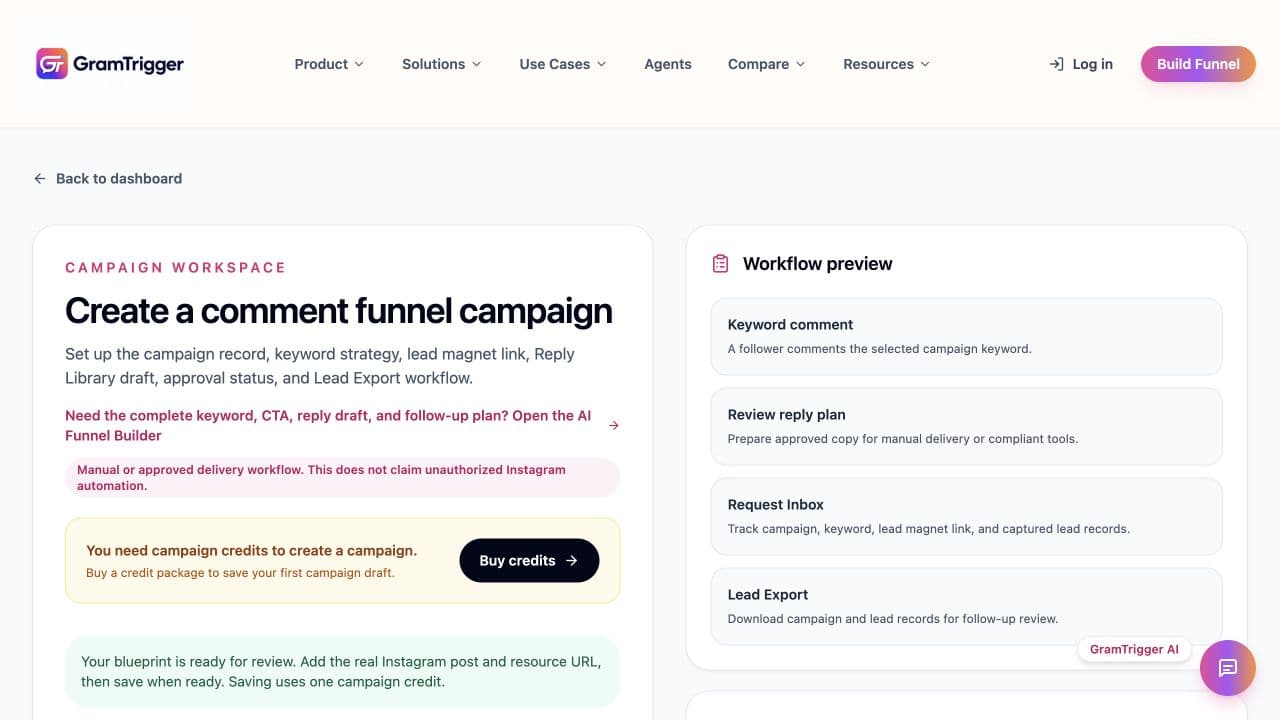
This actual QA screenshot shows a generated blueprint handed into the campaign form. The zero-credit notice is intentional: planning is free, while saving a campaign record uses one purchased campaign credit. This is a test workspace, not a customer result or proof of social publishing.
Actual interface, 20 October 2026. Public request rows are a browser demo; they are not imported Instagram leads.
1. Plan without signup. Generate keyword, caption, reply and follow-up drafts with transparent rules.
2. Keep your review copy. Copy or download the plan; optionally save the latest inputs on your browser for seven days.
3. Decide whether to save a campaign. Create an account, review the campaign form and compare one-time credits. Check your requirements before purchase.
Social account connection and publishing are currently unavailable pending integration setup. Buying campaign credits does not verify or activate an external social connection. Use a separately approved delivery workflow.
Agency campaign planning questions
Can an agency use the builder before creating an account?
Yes. Generate, review, copy and download a rules-based blueprint without signup. The public request table is a demo, and optional browser saving is not account storage.
Are the checklist ticks a saved client approval?
No. They are your temporary acknowledgements for the displayed result. Keep client sign-off in your existing review process. A new blueprint resets the ticks.
Does the free CSV include real leads?
No. An empty table exports headers only. Any demo rows are entered or loaded explicitly and remain clearly labelled as practice data.
Do campaign credits enable automatic messages?
No. Credits save campaign records. Social connection and publishing remain unavailable pending setup; automatic DM delivery is not verified.
What happens when a blueprint is handed into the campaign form?
You review the title, keyword, post, resource URL and reply. Saving requires one purchased credit; opening the form does not create the record or send anything.
Which existing resources explain the next step?
Use the free builder to evaluate output, How It Works for the sequence, and Pricing for the unchanged one-time packs. Choose separately verified delivery tools when required.
Review one client idea before buying credits
Start with a useful draft, assess the review and export workflow, and keep your delivery requirements separate. Expand only when your team understands the account storage, credit cost and external tools it needs.