Who it is for
Creators selling digital products, coaches, course creators, consultants, newsletter creators, personal brands, creator agencies, social media managers, community managers, and virtual assistants.
Funnel Blueprint Builder
Turn an offer and lead magnet into a Campaign Blueprint: keyword strategy, comment CTA, Reply Library draft, approval workflow, Request Inbox stages, Lead Tracking, and Lead Export fields.
GramTrigger helps plan and manage lead magnet workflows; it does not scrape users or auto-send unauthorized DMs. Use approved tools and follow platform rules.
Creators selling digital products, coaches, course creators, consultants, newsletter creators, personal brands, creator agencies, social media managers, community managers, and virtual assistants.
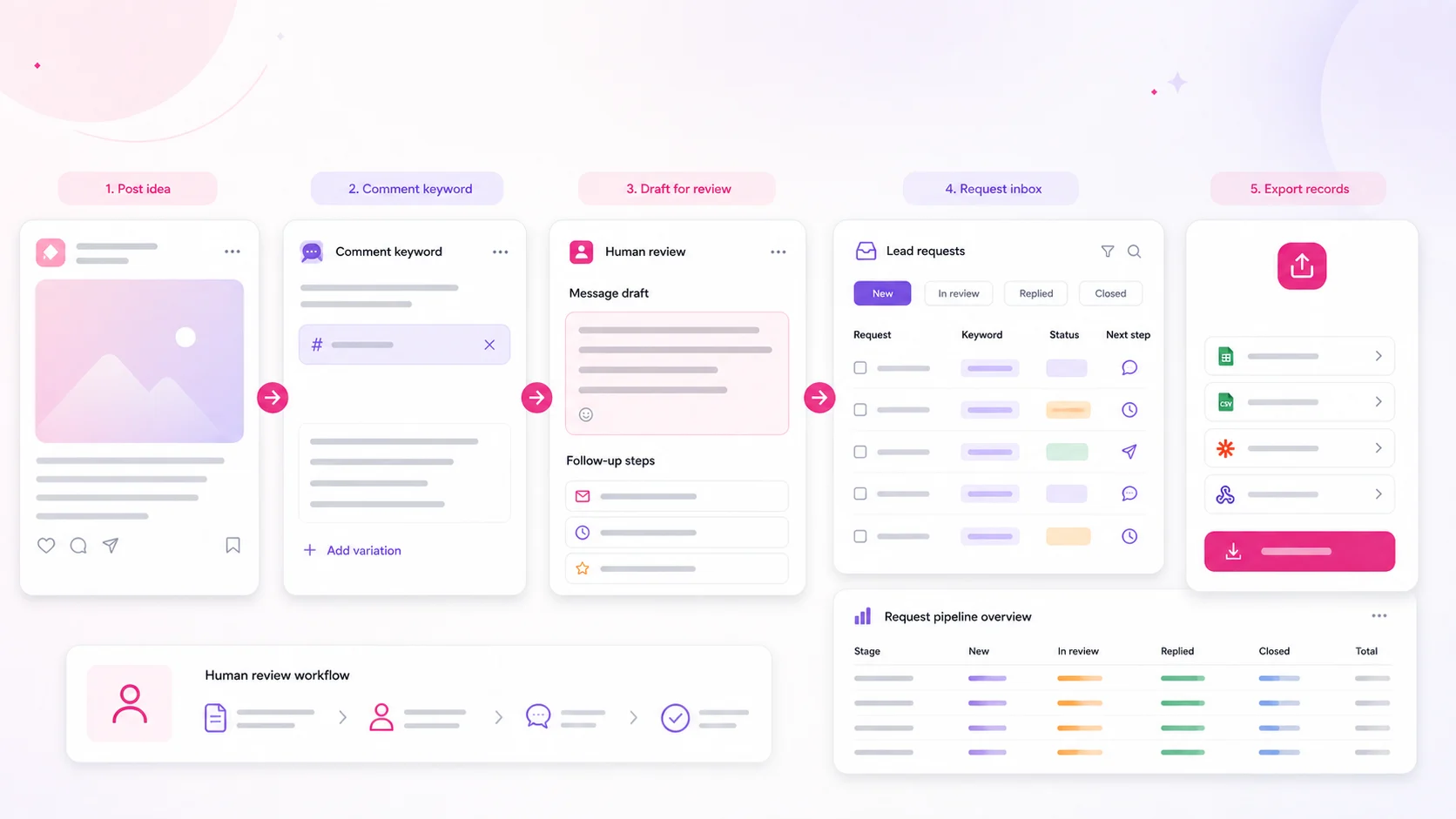
Offer → Lead Magnet → Funnel Blueprint Builder → Keyword Strategy → Comment CTA → Reply Draft → Review & Approval → Campaign Launch → Request Inbox → Lead Tracking → Export.
Lead magnet ideas, keyword options, comment CTAs, a Reply Library draft, follow-ups, Approval Queue notes, Request Inbox stages, Lead Export fields, and compliance reminders.
Why each step matters
A clear keyword makes the request easy to recognize and keeps the Request Inbox clean.
The CTA sets expectations before people comment, reducing confusion and mismatched requests.
A reviewed draft keeps replies consistent while leaving the final send decision human-controlled.
Creators, clients, and agencies can approve the CTA, link, and reply draft before launch.
Requests move from comment interest into a trackable workflow instead of scattered notes.
Exports preserve the campaign record for follow-up, reporting, and client review.
Campaign manager mode
A good funnel is not only copy. It is ownership, review, approval, delivery, and reporting. Use this operating checklist before turning a blueprint into a saved campaign.
Approves the offer, lead magnet promise, voice, and final reply draft.
Checks fields, tests the link, updates Request Inbox rows, and flags edge cases.
Confirms CTA clarity, compliance notes, opt-out respect, and no exaggerated claims.
Exports records, summarizes status, archives the campaign, and documents improvements.
The offer, resource link, keyword, CTA, reply draft, approvals, owner, and export fields are complete.
The campaign can be saved, but one item needs review before launch: link, owner, CTA, compliance note, or draft.
The campaign depends on unsupported automation, unclear consent, missing approvals, or claims the product cannot support.
Build the Campaign Blueprint
Generation uses transparent rules. No AI model or social account connection is required. Keep the plan by copy, text download or optional seven-day browser saving; account campaign storage requires a paid credit.
Saving is optional and keeps only your latest generated planning inputs on this browser for seven days. It does not save to your account or include demo request rows. Use a private device, or download the plan and clear the browser copy.
This actual QA screenshot shows a generated blueprint handed into the campaign form. The zero-credit notice is intentional: planning is free, while saving a campaign record uses one purchased campaign credit. This is a test workspace, not a customer result or proof of social publishing.
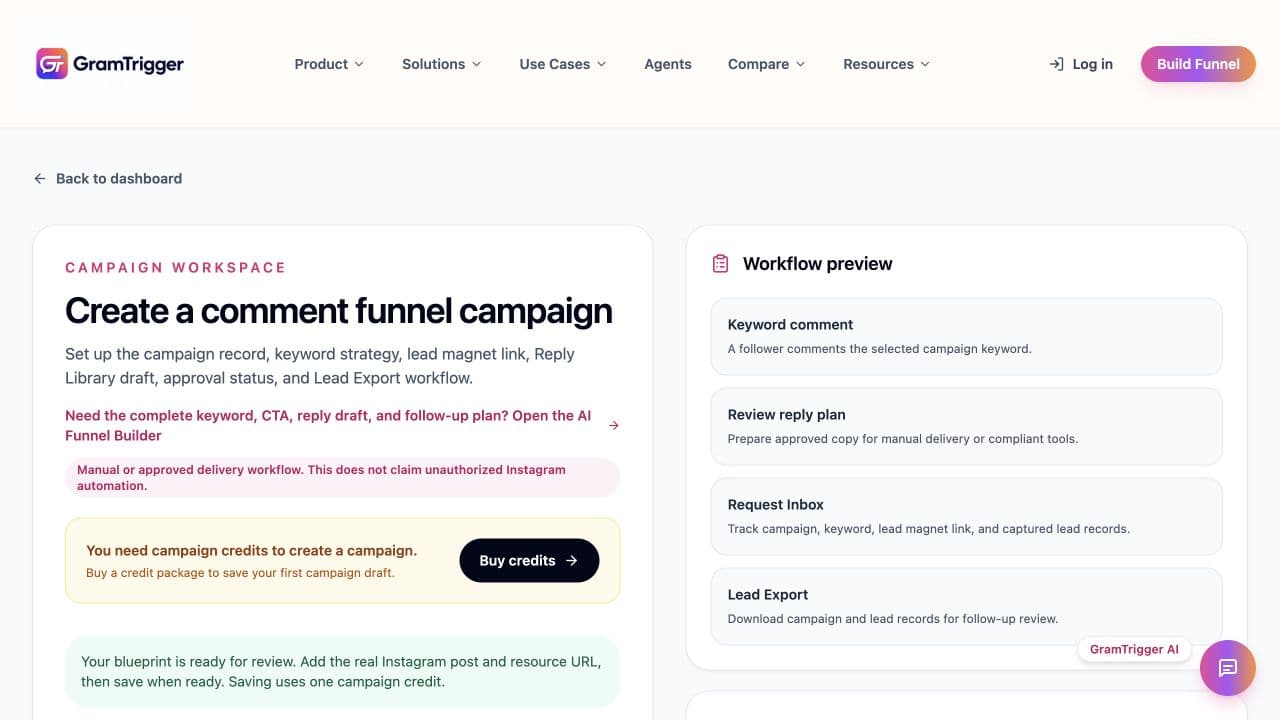
Social account connection and publishing are currently unavailable pending integration setup. Buying campaign credits does not verify or activate an external social connection. Use a separately approved delivery workflow.
Sample funnel
Fictional planning data—no real creator, requests, or results.
Keyword: CHECKLIST
Comment CHECKLIST and I’ll send you the buyer prep guide.
Here’s the Free Homebuyer Checklist. If you want, reply with a question about preparing for your first purchase.
Review before sending.
Record only user-initiated requests. Review the draft, mark delivery, set one relevant reminder, document the response, and export only the fields needed for an approved next step.
Start with a helpful check-in, use a soft next step only when relevant, close the loop politely, and never continue after an unsubscribe or stop request.
It is a workflow that invites someone to request a resource with a comment keyword, delivers the resource through a reviewed message or approved tool, and tracks the request and appropriate follow-up.
Not through this builder. It creates message drafts and a request workflow for human review. Use an approved messaging integration where required and available.
No. GramTrigger organizes the campaign plan, draft copy, request status, and export fields. It does not claim to replace an approved platform messaging tool.
Yes. It supports guides, checklists, templates, mini-courses, resource lists, recipes, workouts, real estate lists, consultations, and offers.
Yes. Agencies can generate a repeatable draft for client review, then create a campaign record in the protected GramTrigger workspace.
Yes. After generating, choose Save blueprint on this browser. Restore the latest inputs here within seven days, or download the plan as text. This is browser storage, not account sync; demo request rows are excluded.
No. The public blueprint is free, while a new account starts with zero campaign credits. Saving a campaign record requires one purchased credit. Social publishing is currently unavailable pending setup.
Yes. The generated report includes a browser-local request table and CSV export. The public preview does not persist personal contact data.
Choose a short, relevant word that is easy to type and distinctive enough for the resource, such as CHECKLIST, GUIDE, TEMPLATE, RECIPE, or PLAN.
Follow up only when it remains relevant, provide a helpful check-in, stop after a limited sequence, and immediately respect opt-out or stop requests.