
Creator Growth
Creator Email List Growth From Instagram Comments
10 min read
For creators, an email list is the most valuable asset you can build outside of the content itself. Instagram algorithms change, reach fluctuates, and platform policies shift without warning. Your email list is the one channel you own completely. Growing that list from Instagram comments is one of the most natural and effective strategies available, because the people who comment on your content have already demonstrated interest in what you create. This guide is written specifically for creators — solo operators building a personal brand — and covers how to plan free resources that motivate comments, choose keywords that work, manage the incoming requests efficiently, deliver those resources in a way that builds trust, and convert commenters into long-term email subscribers. The approach is compliance-aware, built around a manual review process, and designed for creators who want sustainable growth without risky shortcuts.

GramTrigger methodology
Original operating system for Creator Email List Growth From Instagram Comments
The GramTrigger method treats every comment campaign as an approval workflow, not an automation shortcut. The goal is to prepare the offer, lead magnet, keyword strategy, Reply Library draft, Request Inbox stages, handoff owner, and Lead Export fields before comments turn into operational work.
Campaign Blueprint SOP
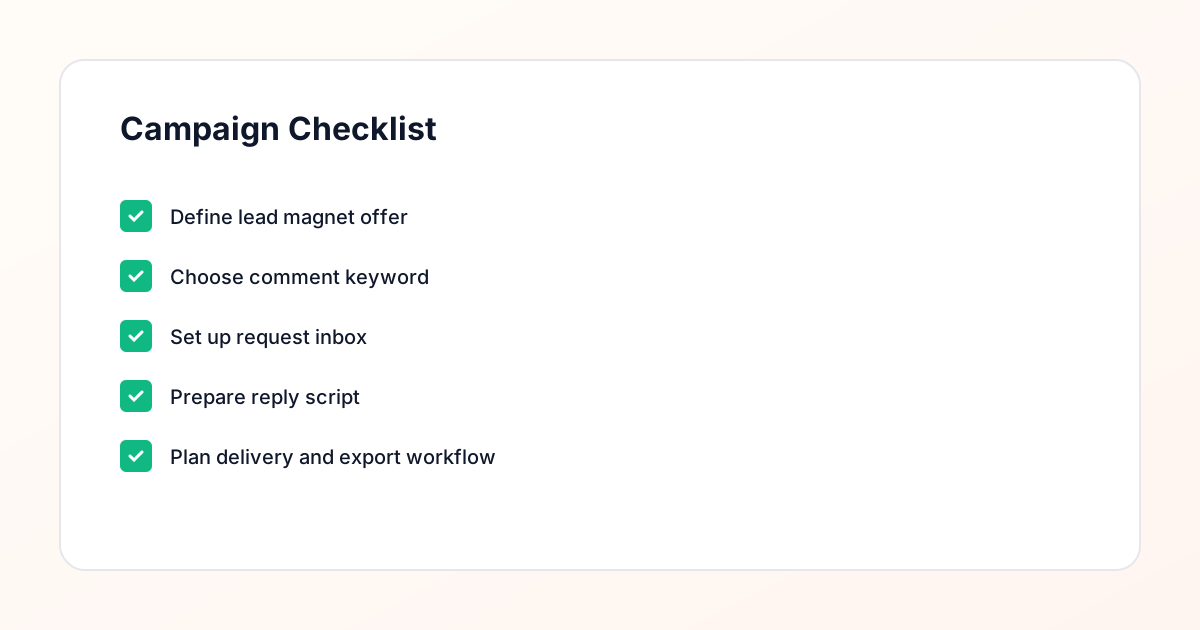
Confirm the offer, lead magnet, keyword strategy, comment CTA, reply draft, owner, approval status, and Lead Export fields before launch.
Comment Funnel Workflow
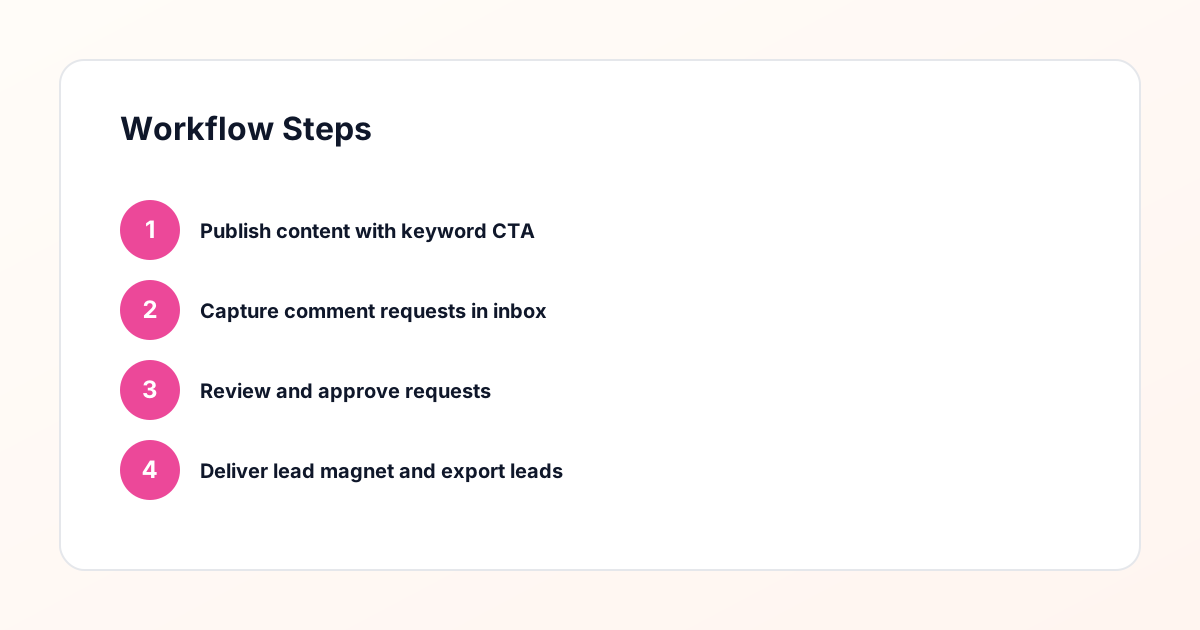
Use the same path everywhere: Offer → Lead Magnet → AI Funnel Builder → Keyword Strategy → Comment CTA → Reply Draft → Review & Approval → Campaign Launch → Request Inbox → Lead Tracking → Export.
Approval Queue Workflow
Review caption CTA, pinned comment, reply draft, lead magnet link, compliance notes, and client approval before a campaign goes live.
Export Readiness Checklist
Export only after records have clear status, no sensitive private data, an owner, follow-up stage, and a documented next action.
Campaign Recovery Workflow
If requests are missed, pause new promotion, review pending records, update Reply Library drafts, communicate manually where appropriate, and document the process fix.
Decision framework
Use this matrix before choosing the next step.
Manual review reminder
Draft response — review before sending. Use approved tools and follow platform rules. GramTrigger helps plan and manage lead magnet workflows; it does not scrape users or auto-send unauthorized DMs.
Workflow Overview
Campaign Checklist
Why Creators Need an Email List More Than Ever
Instagram is an excellent platform for building an audience, but it is a terrible place to store one. Algorithm changes can reduce your reach overnight. Account restrictions can limit your ability to post or engage. Platform policies can shift in ways that affect your content visibility. An email list insulates you from all of these risks because it is a direct channel to your audience that no algorithm controls. When you send an email, it arrives. When you launch a product, announce a collaboration, or share important news, your email list is the most reliable way to reach the people who care most about your work. For creators specifically, the email list also enables monetization strategies that are difficult on Instagram — paid newsletters, direct product sales, course launches, and membership programs all work better with an email list than with social media followers.
Planning Free Resources That Motivate Comments
The free resource you offer in exchange for a keyword comment is the foundation of the entire strategy. For creators, the best resources are those that extend the value of your content in a practical way. If you create content about productivity, a free weekly planning template makes sense. If you create content about photography, a free preset pack or editing checklist works well. The resource should feel like a natural extension of what you already share, not a disconnected generic download. Consider the format carefully. Creators often overcomplicate lead magnets with elaborate ebooks that take weeks to create. A simple, well-designed one-page checklist or template can be more effective because it delivers immediate value and is easy to produce. Start with something small, test whether your audience responds, and iterate from there.
Choosing Keywords That Match Your Brand
Your keyword should feel natural within the context of your content and brand. If you are a travel creator offering a packing checklist, "PACK" is intuitive. If you are a cooking creator sharing a meal prep guide, "MEALS" fits naturally. The keyword should be something your audience would reasonably type without having to think hard about spelling or remember a complex phrase. Single words work best. They are fast to type, unlikely to be misspelled, and easy to remember. Avoid keywords that could be confused with common conversational words — if your keyword is "LOVE," you will capture comments that have nothing to do with your campaign. Also consider using different keywords for different resources. If you offer a template pack and a mini-course, using "TEMPLATE" and "COURSE" respectively lets you track which resource each person requested and tailor your follow-up accordingly.
Creating Content That Drives Keyword Comments
The content piece that promotes your lead magnet needs to deliver standalone value and create a clear reason to comment the keyword. For carousel posts, share actionable information across the slides and save the keyword call to action for the final slide and the caption. For Reels, demonstrate something valuable quickly and mention the resource at the end. The instruction should be explicit and repeated. "Comment PACK and I will send you my complete packing checklist" is clear. Burying the instruction in the middle of a long caption where people might not read it is a common mistake. Put the instruction at the beginning of the caption, at the end, and in the visual content itself if possible.
Managing the Request Inbox as a Solo Creator
As a solo creator, you are likely handling everything yourself — content creation, comment management, request review, delivery, and follow-up. This means your request inbox needs to be efficient to process because your time is limited. The key is batching. Instead of checking for new keyword comments every hour, set aside two or three specific times per day to process your entire inbox in one session. During each session, review all pending requests, send delivery messages to approved ones, and send follow-ups to anyone who is due. This batching approach is far more time-efficient than constantly context-switching between content creation and request management. GramTrigger organizes your request inbox so you can see everything at a glance, filter by campaign, and track which requests need attention. This structure lets you process your entire inbox in a focused session rather than spending all day scattered across comments and DMs.
The Review Step: Keeping It Personal and Compliant
As a creator, your relationship with your audience is your biggest asset. The review step in your delivery workflow is not just a compliance measure — it is an opportunity to maintain the personal connection that makes your brand different from faceless accounts. When you review each request, you are looking at a real person who engaged with your content. Take a moment to look at their profile, notice what they post about, and customize your delivery message accordingly. A message that says "Hey Sarah, I saw you are also into travel photography — here is the packing checklist you requested. Let me know how it works for you!" is dramatically more effective than a generic blast. This manual approval and personalization process is what makes the comment keyword approach a safer alternative to spammy automation. You are building relationships one conversation at a time, and that compounds over time into a loyal audience and a thriving email list.
Delivering Resources and Building Trust
The delivery message is your first direct interaction with a commenter outside of the public comment section. Make it count. Your message should feel warm, personal, and genuinely helpful. Deliver the resource clearly with a direct link, explain briefly what it contains, and let them know they can reach out if they have questions. This is also an opportunity to reinforce your brand voice. If your Instagram content is humorous, let some humor into the delivery message. If your brand is more professional and educational, maintain that tone. Consistency between your public content and your private messages builds trust, and trust is what makes people comfortable joining your email list. The resource itself also needs to deliver on its promise. If your packing checklist is thin or poorly designed, it undermines the trust you built through your content. The lead magnet is a representation of your brand — treat it with the same care you put into your posts.
Converting Commenters to Email Subscribers
The conversion from commenter to email subscriber happens in the follow-up. After delivering the resource, wait one to three days and then send a message that checks in and extends the email list invitation. The invitation should be framed around value: what will they get by subscribing? More resources like the one they just downloaded? Behind-the-scenes content? Early access to new projects? Be specific about what the email list offers, because "join my newsletter" is not compelling on its own. Also consider timing your email list invitation around something concrete — a new resource you are about to send to subscribers, an upcoming project launch, or exclusive content that is only available through email. Giving people a specific reason to subscribe now rather than later increases conversion rates. GramTrigger follow-up tracking ensures you do not miss this critical step in the workflow.
Nurturing Your Email List After the Transition
Once someone joins your email list from an Instagram comment campaign, the nurturing begins. Your welcome email should acknowledge the Instagram connection, deliver any promised additional value, and set expectations for what they will receive and how often. From there, consistency is key. Send emails on a regular schedule — whether that is weekly, biweekly, or monthly — and make sure each email provides genuine value. The people who joined through your comment funnel came because they wanted a specific resource. Your ongoing emails should continue delivering that kind of practical value while also building the relationship through personal stories, behind-the-scenes insights, and occasional promotions. The goal is to make your email list feel like an extension of the relationship they started on Instagram, not a completely different experience with a different tone and purpose.
Tracking Growth and Refining Your Approach
As a creator, you should track your email list growth from Instagram comments with the same attention you give to your Instagram analytics. Monitor how many keyword comments each post generates, how many requests convert to deliveries, how many follow-ups result in email subscriptions, and what your overall conversion rate is from comment to subscriber. Over time, this data reveals which content topics, resource types, and keyword choices produce the best results. You might discover that your photography tutorials generate more email subscribers than your gear reviews, or that template resources outperform guide resources. These insights let you focus your energy on the campaigns that grow your list most effectively. GramTrigger export functionality gives you the raw data to build these analyses and make informed decisions about your content and campaign strategy going forward.
Compliance Note
GramTrigger helps organize Campaign Blueprints, Reply Library drafts, Request Inbox stages, approvals, delivery status, Lead Exports, and reports. Delivery should be handled manually or through approved tools depending on your account and available platform support.