
Webinar Workflows
Instagram Comment to Webinar Signup Workflow
10 min read
Webinars are a powerful way to build deep audience engagement and drive meaningful conversions, but filling those webinar seats starts with getting the right people to register. Instagram can be a strong registration channel when you pair it with a structured comment-to-signup workflow. This guide walks through building that system — from planning your webinar and choosing keywords to managing registration requests, delivering the signup link, and tracking attendance through a compliance-aware process.

GramTrigger methodology
Original operating system for Instagram Comment to Webinar Signup Workflow
The GramTrigger method treats every comment campaign as an approval workflow, not an automation shortcut. The goal is to prepare the offer, lead magnet, keyword strategy, Reply Library draft, Request Inbox stages, handoff owner, and Lead Export fields before comments turn into operational work.
Campaign Blueprint SOP
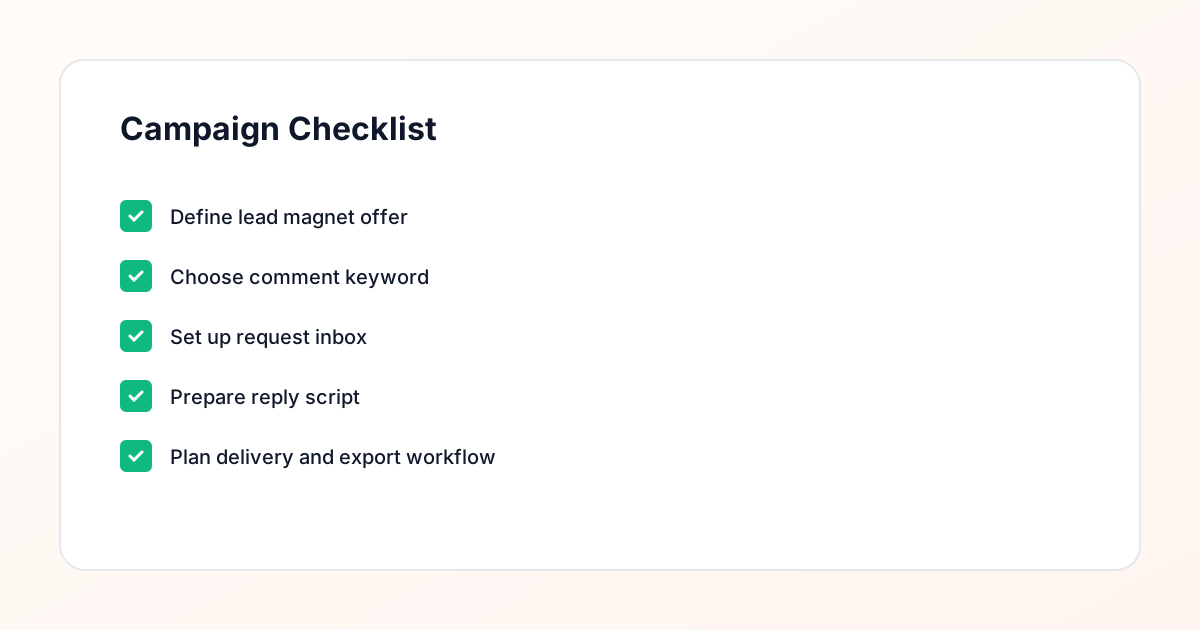
Confirm the offer, lead magnet, keyword strategy, comment CTA, reply draft, owner, approval status, and Lead Export fields before launch.
Comment Funnel Workflow
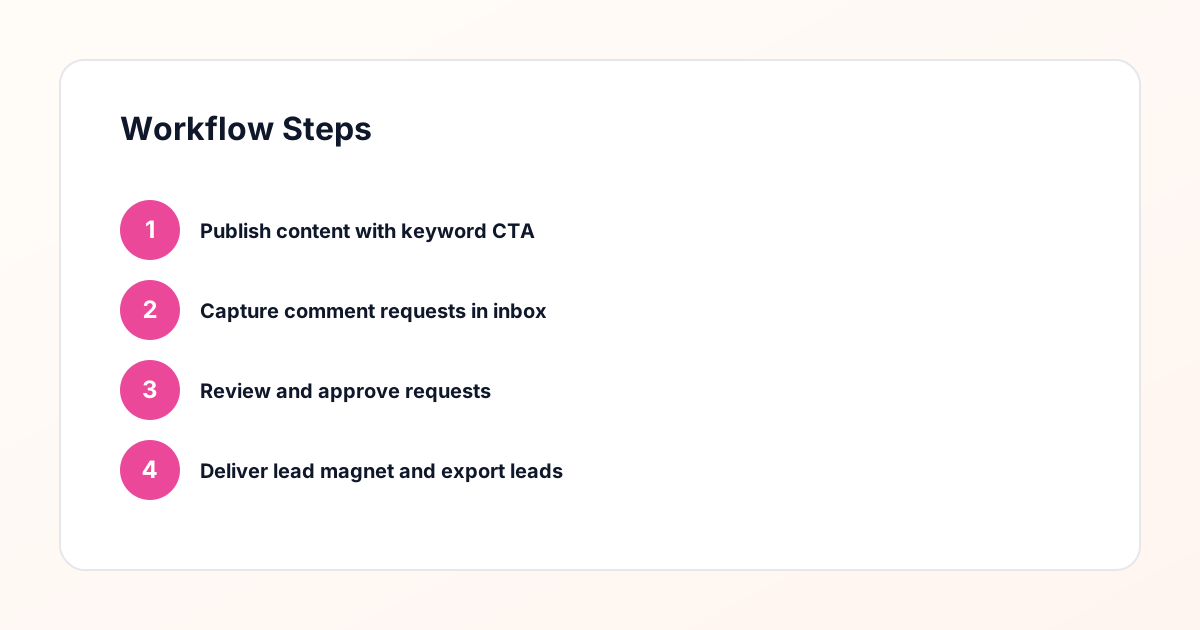
Use the same path everywhere: Offer → Lead Magnet → AI Funnel Builder → Keyword Strategy → Comment CTA → Reply Draft → Review & Approval → Campaign Launch → Request Inbox → Lead Tracking → Export.
Approval Queue Workflow
Review caption CTA, pinned comment, reply draft, lead magnet link, compliance notes, and client approval before a campaign goes live.
Export Readiness Checklist
Export only after records have clear status, no sensitive private data, an owner, follow-up stage, and a documented next action.
Campaign Recovery Workflow
If requests are missed, pause new promotion, review pending records, update Reply Library drafts, communicate manually where appropriate, and document the process fix.
Decision framework
Use this matrix before choosing the next step.
Manual review reminder
Draft response — review before sending. Use approved tools and follow platform rules. GramTrigger helps plan and manage lead magnet workflows; it does not scrape users or auto-send unauthorized DMs.
Workflow Overview
Campaign Checklist
Why Instagram Is a Strong Channel for Webinar Registrations
Instagram reaches people in a discovery mindset — they are browsing, learning, and looking for content that interests them. This makes it an ideal channel for promoting webinars to people who may not be on your email list yet but are genuinely interested in your topic. The challenge has always been converting that interest into registrations without relying on link-in-bio alone, which captures only a fraction of interested viewers. The comment keyword workflow solves this by meeting people where they are. Instead of asking them to navigate to your profile, find the link, and complete a form on their own, you invite them to comment a single word. That comment triggers a structured process: the request lands in your request inbox, you send a personalized reply with the registration link, and the person can sign up directly from their DMs. This approach dramatically reduces friction and captures registrations from people who would never have clicked through a bio link. It also creates a public signal of interest — when other users see comments flooding in with your keyword, it reinforces the perceived value of the webinar.
Planning a Webinar Your Instagram Audience Will Register For
The webinar topic must align with what your Instagram audience cares about, not just what you want to teach. Review your most-engaged content — which posts get the most saves, shares, and comments? What questions come up repeatedly in DMs and story replies? What topic could you teach in forty-five to sixty minutes that delivers genuine value while naturally leading to your paid offering? The best webinar topics sit at the intersection of audience demand and your expertise. They should be specific enough to attract a targeted audience but broad enough to generate meaningful registration volume. "How to Write Instagram Captions That Convert" is more compelling than "General Social Media Tips." Plan the webinar structure with a clear agenda, three to five key teaching points, and a defined offer or next step at the end. Create a registration page that clearly communicates what attendees will learn, how long the webinar runs, and what they need to do to attend. This page is where your delivery workflow sends people, so it needs to convert.
Choosing the Right Keyword for Your Webinar Campaign
Your webinar keyword should be action-oriented and easy to type. "WEBINAR," "REGISTER," "SEAT," or "JOIN" all work well because they communicate intent clearly. Avoid clever or unusual words — the goal is zero friction between seeing the call-to-action and typing the comment. Consider your audience when making the final choice. If your audience is international, choose a word that is universally understood. If your audience skews toward mobile users, keep it short. Once you select the keyword, build your promotional content around it. Every post, story, and reel that mentions the webinar should include the same keyword and the same call-to-action format. This consistency helps your audience remember the keyword and reduces misspellings. Your campaign management tool captures every comment with the keyword and routes it to your request inbox, where you manage the registration delivery process from start to finish.
Setting Up the Webinar Comment Keyword Campaign
Configure your webinar campaign in the campaign management tool by defining the keyword, linking it to the posts where you will promote the webinar, and setting up the public acknowledgment reply. When someone comments the keyword, the public reply lets them know their request was received — something like "Check your DMs for the registration link!" Then configure the request routing so each keyword comment creates an entry in your request inbox with the commenter details and timestamp. Before launching, run a complete test. Comment the keyword from a test account, verify the public reply, check the request inbox entry, send a test delivery message, and confirm the registration page loads correctly. Fix any issues before real audience members encounter them. Once testing passes, your campaign is ready. As posts go live and audience members start commenting, requests flow into your inbox in a structured, trackable format that you can process efficiently.
Managing Webinar Registration Requests
Your request inbox becomes the control center for webinar registration delivery. Each request entry shows who wants to register, which post they commented on, and when they requested the information. Process requests promptly — webinar promotion is time-sensitive because registrations need to happen before the event date. Develop a processing routine that keeps up with demand, especially in the first forty-eight hours after your main promotional post goes live. During each processing session, review new requests, send personalized replies with the registration link, and mark each as complete. The reply review step ensures every message is accurate and personalized. Include the webinar title, date, time, and registration link in your delivery message so the recipient has everything they need in one place. If your webinar has limited seats or a registration deadline, mention that in the delivery message to create appropriate urgency. The campaign management system tracks every request and reply, giving you a complete record of your registration outreach.
Writing Delivery Messages That Drive Registrations
The delivery message for a webinar registration campaign carries more information than a typical lead magnet delivery because the recipient needs to know when the webinar is, what it covers, and how to register — all in one concise message. Structure it clearly: personal greeting, webinar title, date and time with timezone, one sentence about what they will learn, the registration link, and a brief note about what happens after they register. For example: "Hey Morgan! Here is the link to register for our webinar on Instagram Content Strategy, happening Thursday March 15 at 2 PM EST. You will learn the exact framework we use to plan a month of content in one session. Register here: [link]. You will get a confirmation email with all the details after signing up." This message gives the recipient everything they need to make a decision and take action immediately. Keep templates in your campaign management tool with the variable details — date, time, title — updated for each webinar campaign. Personalize the greeting and any audience-specific references for each reply.
Connecting Registrations to Your Email Workflow
The webinar registration page should integrate with your email marketing platform so every person who registers receives automated confirmation and reminder emails. This integration is critical because webinar attendance rates depend heavily on effective reminder sequences. When someone clicks through from your delivery message and registers, their information should flow directly into your email system with the appropriate webinar tag or segment. Your email sequence should include an immediate confirmation with the webinar details and a calendar invite link, a reminder email twenty-four hours before the webinar, a reminder email one hour before, and a final "starting now" email at launch time. Each email should reinforce the value of attending and make the join link easy to find. After the webinar, send a follow-up email with the replay link for registrants who signed up but did not attend, plus any offers or next steps you presented during the session. This email workflow turns Instagram-driven registrations into attended webinars into follow-up conversions.
Tracking Registration and Attendance Metrics
Track the full funnel from Instagram comment to webinar attendance to understand your campaign effectiveness. Start with the Instagram metrics: keyword comments per post, requests received, and replies sent. Then track the registration metrics: registration page visits, completed registrations, and registration source. Finally, track the webinar metrics: attendance rate, engagement during the webinar, and post-webinar actions like offer acceptance or replay views. The conversion rates between each stage reveal where to focus improvement efforts. If keyword comments are strong but registration page conversions are low, your registration page may need better copy or a simpler form. If registrations are strong but attendance is low, your reminder email sequence may need improvement. Review these metrics after each webinar and make targeted adjustments for the next one. Your campaign management tool provides the Instagram-side data, while your webinar platform and email tool provide the downstream metrics. Combining all three gives you a complete picture of performance.
Running Recurring Webinar Campaigns on Instagram
Many businesses run webinars on a regular schedule — weekly, biweekly, or monthly — and Instagram can be a consistent registration channel for each session. The workflow you build for one webinar applies directly to the next, with only the topic, date, and keyword details changing. Create a repeatable campaign template that you duplicate for each new webinar, updating the keyword if needed, the delivery message with the new details, and the linked posts. Promote each webinar across multiple posts over a one to two week period before the event. Use different content angles for each post — one might highlight a specific teaching point, another might share a testimonial from a previous attendee, and another might address a common question the webinar answers. Each post uses the same keyword and drives requests to the same campaign inbox. Over time, you build a predictable registration pipeline from Instagram that feeds your webinar schedule consistently. The campaign management system makes this repetition efficient because the operational process never changes.
Maintaining Compliance in Your Webinar Registration Workflow
Webinar registration campaigns involve messaging Instagram users directly and collecting their information for email marketing, which requires attention to compliance at multiple points. Only message people who have explicitly opted in by commenting your keyword. Collect email addresses through a proper registration form with clear consent language. Identify yourself in every message and email. Include unsubscribe options in all emails. The manual approval process in your request inbox ensures every direct message is sent to someone who requested it, making this a compliance-aware approach and a safer alternative to spammy automation tools that message users without consent. Keep complete records of each request, reply, and registration in your campaign management system. These records document the consent chain and support compliance if questions arise. As platform guidelines and privacy regulations evolve, review your workflow periodically to ensure it continues to meet current standards. A well-structured process makes these reviews straightforward because every step is documented and intentional.
Compliance Note
GramTrigger helps organize Campaign Blueprints, Reply Library drafts, Request Inbox stages, approvals, delivery status, Lead Exports, and reports. Delivery should be handled manually or through approved tools depending on your account and available platform support.